STPHE
STPHE Organize without losing intent.
Folders group prompts visually while keeping SillyTavern’s native prompt list in sync.
Mute versus force all
| Control | Behavior |
|---|---|
| Folder toggle | Mutes the folder and descendants. Restoring it preserves each prompt’s intended on/off state. |
| Enable all | Sets every prompt in the folder and descendants on; clears overlapping folder mute state. |
| Disable all | Sets every prompt in the folder and descendants off; clears overlapping folder mute state. |
| Prompt toggle | Changes that prompt’s intended state. A muted ancestor still prevents it from being active. |

Read the toggle colors
- On: intended enabled state.
- Off: disabled prompt or muted folder.
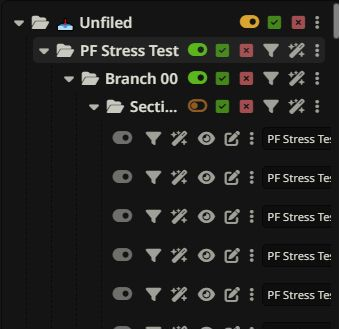
- Gray suppression: intended on, but a containing folder is muted.
- Yellow mixed state: a folder contains both intended on and intended off prompts.
The enabled count describes intended states. A separate “currently active” count appears when folder mutes suppress some of them.
Example: restoring a mixed folder
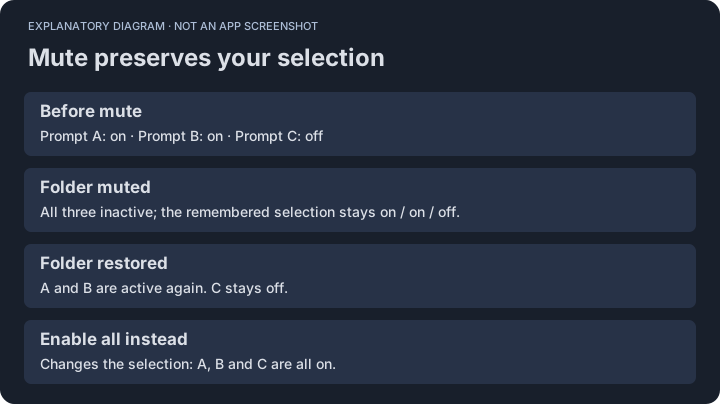
Suppose a folder contains three prompts: two enabled and one disabled. Muting the folder makes all three inactive in SillyTavern, but keeps the remembered two-on/one-off selection. Restoring the folder activates the original two prompts. Use Enable all only when you want to change the disabled prompt as well.
Nested folders
A child folder can be muted independently. Turning its parent off and back on does not erase that child mute. Unfiled is a separate bucket, not a master switch for all named folders.
Edit and preview
Use the eye control for a read-only preview and the edit control for SillyTavern’s native editor. Save in the native editor to update the prompt. Full Preview combines enabled prompt content for inspection; it is not a guarantee of the complete provider-specific request.
Move and reorder
Use move selectors or drag and drop. Ctrl/Cmd-click selects multiple entries. Moving a selected parent includes its descendants. The native prompt order follows the tree’s top-to-bottom order.
When loading ends
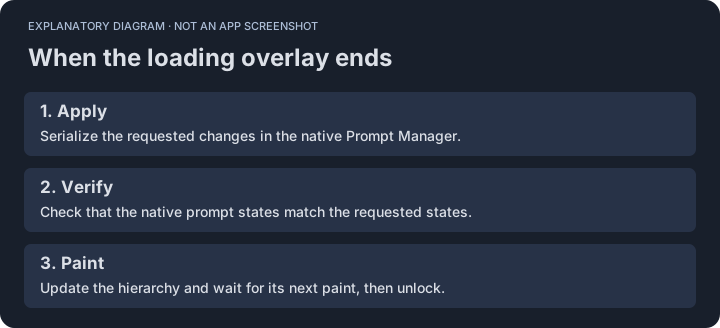
STPHE serializes native changes, verifies requested states, updates the tree, and waits for its paint before releasing the loading overlay. There is no fixed completion delay. Large native context calculations can still take time.